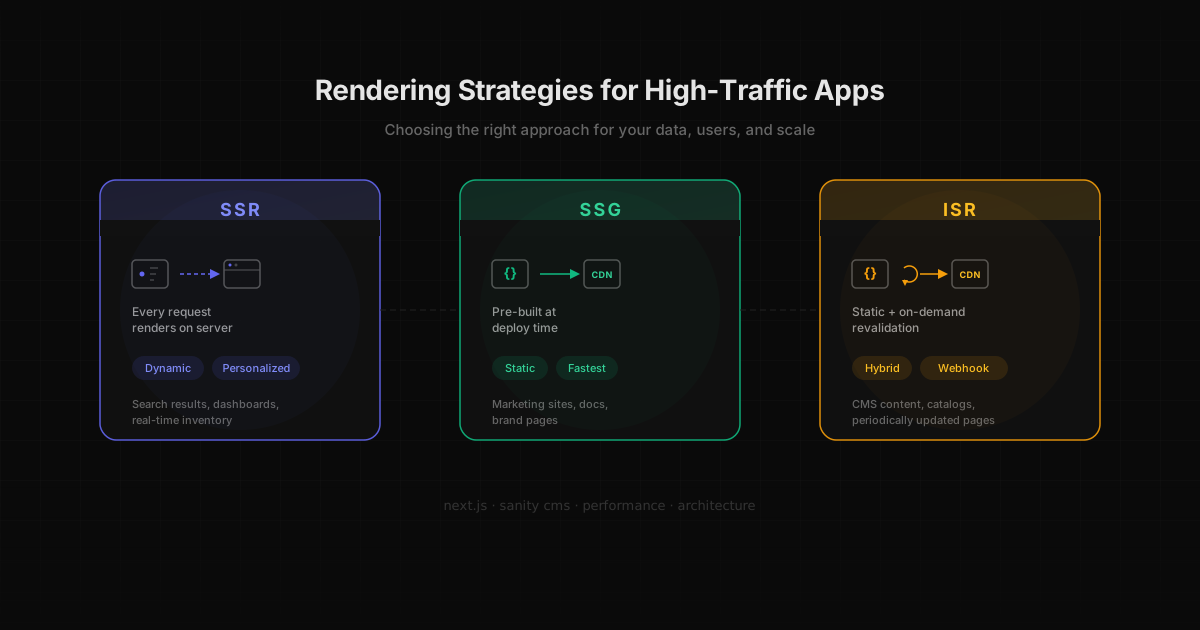
Rendering strategy is one of the most impactful architectural decisions you'll make for a high-traffic application. Get it right and your pages load fast, your infrastructure costs stay low, and your team ships with confidence. Get it wrong and you're fighting performance issues, paying for servers you don't need, or serving stale content to frustrated users.
These aren't theoretical choices for me. They're decisions I've made across real projects serving millions of users, from bus ticket platforms to restaurant chains with 400k+ monthly visitors. Here's what I've learned.
SSR: When Every Request Needs Fresh Data
Server-Side Rendering generates HTML on the server for every incoming request. The browser gets a fully rendered page instead of an empty shell that needs JavaScript to fill in the content.
Use SSR when your content is dynamic, personalized, or changes on every request. Think search results, user dashboards, real-time inventory, or pages where each visitor sees something different.
Where I used it: DeOnibus
At DeOnibus, we had a travel tech platform processing millions of orders per year across 100+ white-label domains. Each storefront had unique branding, pricing, and route availability that needed to be server-rendered on every request. No two users saw the same page.
The frontend was a legacy JavaScript app that took 10 seconds to load. I led a gradual migration to React with SSR, Webpack, lazy loading, Context API, and Redis caching. The catch was that we couldn't break any of the 100+ domains in the process. Zero downtime. No big bang rewrite.
The result: a 60% reduction in page load time (10s down to 4s) and a 30% increase in conversion rate on a platform with millions of annual orders. Those numbers changed the trajectory of the business.
I also used SSR at MINE, a high-ticket fashion app where product pages needed server rendering for SEO, and AI-curated recommendations varied per user. The combination of personalized content and SEO requirements made SSR the clear choice.
Trade-offs
SSR comes with real costs. Every request hits your server, which means higher infrastructure spend and potentially slower Time to First Byte (TTFB) under load. At DeOnibus, we mitigated this with Redis caching for common routes and data. Without that caching layer, the server costs would have been painful at scale.
If your content doesn't change per request, you're paying for computation you don't need.
SSG: When Content is King
Static Site Generation builds your pages at deploy time. The HTML is pre-generated and served directly from a CDN edge node. No server computation, no database queries, just a file served as fast as possible.
Use SSG when your content changes infrequently. Marketing sites, documentation, brand pages, landing pages, and anything where the same content serves every visitor.
Where I used it: Din Tai Fung
At Planetary, I architected multi-language, multi-region websites for Din Tai Fung across the US, Canada, and Europe. The content lived in Sanity CMS and was pre-built at deploy time. Pages were served from CDN edge nodes worldwide.
Geo-redirects were handled at the middleware level, but the actual content pages were static. Restaurant locations, menus, brand story, press materials. None of this changes on a per-request basis. Building it statically meant users in Toronto got the same fast experience as users in London, with content served from the nearest edge.
I applied the same approach to WSJ brand campaign pages and other marketing sites at Planetary. When content doesn't change between requests, static generation gives you the best performance with the lowest infrastructure cost.
Trade-offs
Build times grow with page count. If you have thousands of pages, deploys can take minutes or longer. And any content update requires a full redeploy. For a marketing site that updates weekly, that's fine. For a catalog with hundreds of items updated daily, it becomes a bottleneck.
That's where ISR comes in.
ISR: The Best of Both Worlds
Incremental Static Regeneration gives you static performance with the ability to update individual pages without rebuilding the entire site. Pages are generated statically, but can be revalidated on demand or after a set time interval.
Use ISR when your content changes periodically but not on every request. E-commerce catalogs, marketing pages with frequent experiments, content-heavy sites with a CMS, anything where editors update content throughout the day and you need those changes reflected without a full redeploy.
Where I used it: TradeZero
TradeZero is an online brokerage platform for trading U.S. stocks and options, with operations across the United States, Canada, the Bahamas, and a growing presence in Europe through the Netherlands. Their Next.js site with Sanity CMS serves marketing pages, platform information, educational content, and localized experiences across multiple regions and languages.
When we started working on the project, adding a new language or locale required code changes and a full build deployment. The marketing team was constantly updating pages, running experiments, and adding new content (dashboards, performance data, promotional numbers), but every update meant waiting for a deploy. It was slow and it bottlenecked the team.
We implemented a combination of webhook-based and time-based ISR revalidation. For content managed in Sanity, we fixed and implemented tag-based revalidation so that when an editor publishes a change, a webhook triggers revalidateTag() for the specific schemas that changed. Only the affected pages regenerate. For data that updates on a regular cadence (like market-related content), we used time-based revalidation as a fallback to keep pages fresh without requiring explicit triggers.
We also restructured the CMS architecture to make i18n scalable. Instead of hardcoding locale support, the new structure lets the team spin up new languages and regions from the CMS without touching code or triggering full rebuilds. This was critical as they expanded into Europe.
The impact was significant: editors went from waiting on deploys to seeing their changes live in seconds, build times dropped because full rebuilds were no longer needed for content updates, and the marketing team could finally run experiments and iterate on pages independently. The improved workflow directly enabled more frequent content updates, which contributed to better conversion rates.
How the revalidation strategy works
TradeZero uses both revalidation approaches, each for a different purpose:
Webhook revalidation (for CMS content):
- Content editor updates a page in Sanity CMS
- Sanity fires a webhook to the Next.js API endpoint
- The endpoint validates the webhook signature and determines which schemas were affected
- It calls
revalidateTag()for those specific content tags - The next visitor gets the freshly generated version, which is then cached again
Time-based revalidation (for periodic data):
- Pages that display regularly updated data set a
revalidateinterval - After the interval expires, the next request triggers a background regeneration
- The stale page is served immediately while the fresh version builds
- Subsequent visitors get the updated page
Using both strategies together gives you precision where it matters (CMS content updates instantly) and a safety net for everything else (periodic data stays reasonably fresh without manual triggers).
Trade-offs
There's a brief stale-while-revalidate window where a visitor might see the old version of a page while the new one generates. In practice, this window is seconds for webhook-triggered updates. For time-based revalidation, the staleness window equals your revalidate interval, so choosing the right value matters. The revalidation logic can also get complex if your content has dependencies (updating a product page should also revalidate the homepage that features it).
How to Choose: A Decision Framework
Here's the decision tree I use:
Is the content personalized per user or per request? Use SSR. Dashboards, search results, and user-specific pages need fresh server renders.
Does the content rarely change (less than daily)? Use SSG. Marketing pages, documentation, and brand sites are perfect candidates.
Does content change periodically but not per-request? Use ISR. CMS-managed content, catalogs, and menus that update throughout the day benefit from static performance with on-demand revalidation.
Still not sure? Most real applications use a hybrid approach. At TradeZero, marketing pages use ISR with webhook revalidation from Sanity, market data pages use time-based revalidation, and any user-specific features (like account dashboards) use client-side rendering with API calls.
Next.js App Router makes mixing strategies per-route straightforward. You don't have to pick one for the entire app.
Practical Tips from Production
After years of shipping high-traffic applications, these are the patterns that consistently deliver results:
Cache aggressively with SSR. If you're using SSR, pair it with a caching layer. Redis at DeOnibus was the difference between manageable server costs and runaway infrastructure spend. Also set proper CDN cache headers for responses that can be cached.
Use webhook revalidation for CMS content, time-based for periodic data. At TradeZero, we used both: webhooks for Sanity content (editors see changes in seconds) and time-based revalidation for data that updates on a regular cadence. Pure time-based ISR (revalidate: 60) for CMS content means your pages are always potentially stale. Webhooks give you precision.
Monitor Core Web Vitals per rendering strategy. Different strategies affect different metrics. SSR impacts TTFB. Heavy client-side hydration impacts INP. Static pages might have stale content. Track these per route, not just site-wide averages.
Consider edge runtime for SSR when latency matters globally. If your SSR app serves users worldwide, running your server functions at the edge (closer to users) can significantly reduce TTFB. This was relevant for the multi-region sites I built at Planetary.
Measure what matters: conversion rate, not just Lighthouse scores. A 30+ point Lighthouse improvement is great, but the metric that changed the business at DeOnibus was the 30% conversion increase. Performance improvements should tie back to business outcomes.
Closing Thoughts
The right rendering strategy depends on your data, your users, and your scale. Don't default to SSR because it feels safe. Don't use SSG for everything because it's simple. Understand your content update patterns, measure the impact on real users, and optimize accordingly.
The best high-traffic applications I've built use a mix of all three strategies, each applied where it makes the most sense. That's the real power of modern frameworks like Next.js: you don't have to choose one. You choose per route, per page, per use case.
Built with Next.js and informed by years of shipping high-traffic applications.